




A structured two-week Access Discovery & Assessment engagement inventories every database object, form, macro, and VBA module across our client’s environment, mapping data dependencies, security gaps, and integration points. We deliver a prioritized modernization roadmap covering Azure, SQL Server, and Power Platform pathways, giving IT leaders a risk-ranked blueprint before committing budget to full-scale migration.
What Does a Codebase Audit Deliver?
A codebase audit delivers a clear, evidence-based roadmap for every Access application still running in production. We built our methodology around a simple reality: uncertainty about Microsoft Access’s future has left many organizations unsure whether to keep investing in legacy systems or start modernizing now. Our access database assessment removes that uncertainty by documenting exactly what an application does, how it’s built, and what risk it carries if left untouched.
For most enterprises, the real question isn’t whether to move off Access. It’s when and how. Our audit answers both parts directly, mapping dependencies, data structures, and business logic before we recommend a single migration step.
What Gets Documented During the Audit?
We inventory every table, query, form, report, and macro tied to the application, along with the VBA code running behind the scenes. This inventory identifies hidden dependencies — linked spreadsheets, shared drives, third-party integrations — that often surprise internal IT teams. We also flag security gaps, data integrity risks, and single points of failure tied to specific employees or desktop machines.
How Long Does an Access Codebase Audit Take?
Timelines vary by application complexity and the number of interconnected systems involved. Our team scopes each engagement individually rather than applying a fixed calendar to every client.
Our audit deliverables typically include:
- A full technical inventory of database objects and dependencies
- A risk assessment covering security, compliance, and single-user vulnerabilities
- A modernization path recommendation, whether Azure, SQL Server, or Power Platform
- A prioritized action plan sequencing decommissioning and migration work
We’ve applied this same audit discipline to database modernization projects spanning mid-market businesses through Fortune 500 enterprises. That range of scale, from department-level tools to enterprise-wide systems, has sharpened our audit process through what we call our 7 Circles of Excellence methodology, ensuring findings hold up under scrutiny at any organizational size.

What Prerequisites Precede a Codebase Audit?
Three prerequisites determine whether a codebase audit succeeds: version inventory, file format cataloging, and licensing verification. We require all three before assigning consultants to an engagement, because skipping any one invites scope surprises mid-project.
Version inventory comes first. Since its original debut, more than 40 versions remain in active use across commercial and federal environments today. That range means our teams cannot assume a single engine or codebase pattern. A database built in an early 2000s version behaves very differently from one running on a current release. We map every version present before scoping the access database assessment, so effort estimates reflect reality rather than guesswork.
What file formats does Access use, and why does that matter for an audit?
Access has saved data under a range of formats since its release, and each one carries different structural quirks. Our audit teams catalog every format present in a client’s environment before assessment work begins. Each format demands distinct tooling and specialized expertise. Missing a format mid-audit forces rework and delays remediation timelines.
Does Access licensing status affect audit prerequisites?
Yes. Microsoft has never announced retirement of Access, and continues supporting it within Microsoft 365 and the perpetual Access LTSC release. That continuity means some client instances remain fully supported while others run unsupported legacy builds. We pull current licensing records before auditing, separating supported systems from those carrying unmitigated risk.
Staffing rounds out preparation. Help4Access, based in San Francisco, CA, maintains a bench of experienced consultants capable of running parallel-track assessments across multiple business units simultaneously. That depth lets us compress discovery timelines without sacrificing the accuracy CIOs and IT Directors need before committing modernization budget.
How Do You Inventory Every Access Database?
A complete inventory starts with locating every database file across the organization, not just the ones IT already knows about. Departments build Access tools independently to manage their own operational data. The platform’s user-friendly interface and rich feature set make it easy to spin up a solution without central approval. That habit creates a discovery problem: finance, HR, and operations teams often maintain databases no one else in the company has ever catalogued.
We treat this discovery phase as the foundation of any access database assessment, since we cannot modernize, migrate, or decommission what we haven’t found first. Before beginning, we confirm two prerequisites: network-level access to shared drives and departmental servers, and a designated point of contact in each business unit who can flag “shadow” databases built outside IT’s purview.
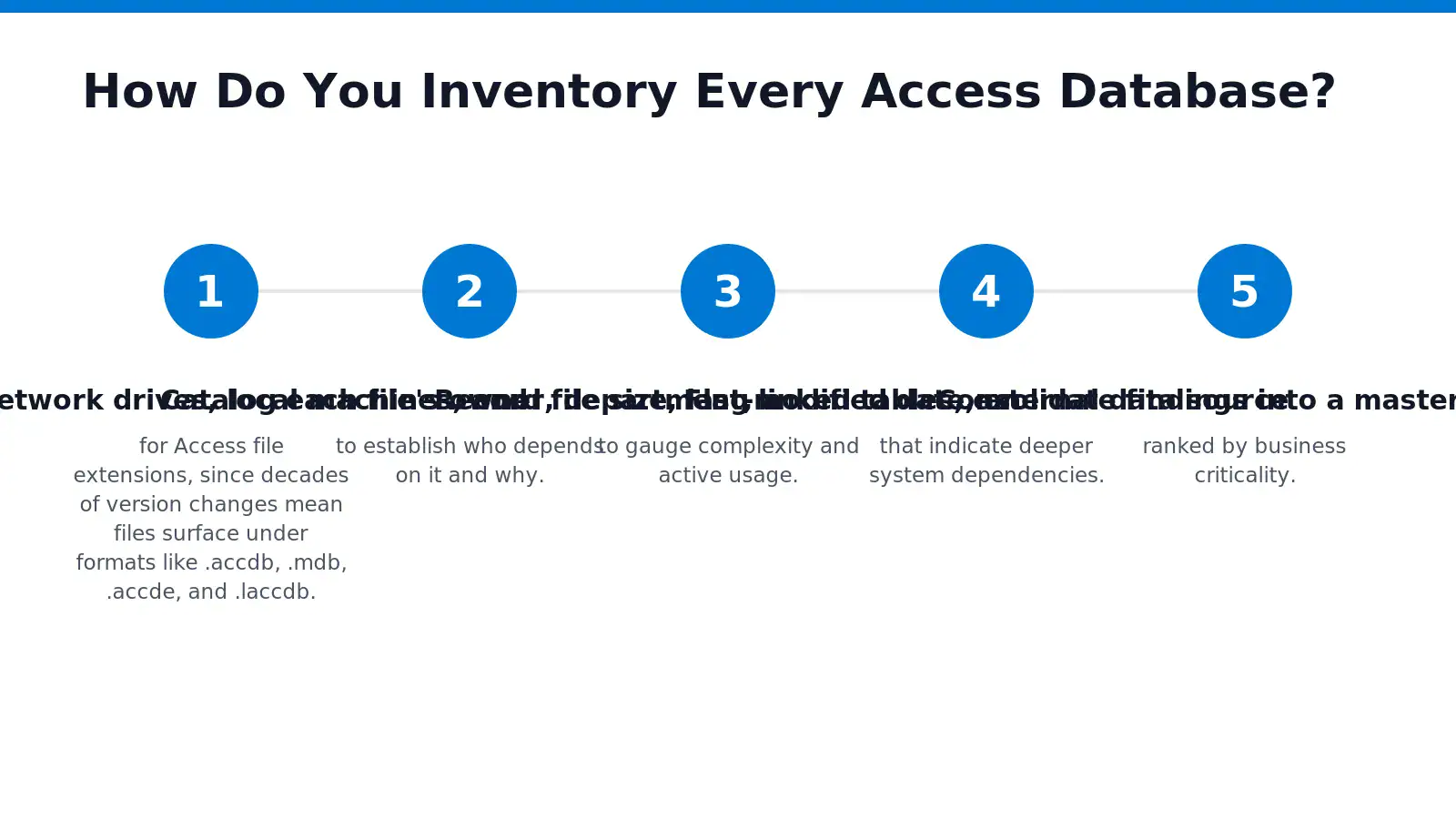
From there, our process follows a fixed sequence:
- Scan network drives, local machines, and SharePoint libraries for Access file extensions, since decades of version changes mean files surface under formats like .accdb, .mdb, .accde, and .laccdb.
- Catalog each file’s owner, department, and business function to establish who depends on it and why.
- Record file size, last-modified date, and user count to gauge complexity and active usage.
- Flag linked tables, external data sources, and macros that indicate deeper system dependencies.
- Consolidate findings into a master inventory ranked by business criticality.
What if a database was built without IT’s knowledge?
Undocumented “shadow” databases are common in Access environments, precisely because the platform lets non-technical staff build tools independently. We address this by interviewing department leads directly, rather than relying solely on network scans, which often miss files stored on local drives or removable media.
Our discovery methodology draws on lessons from prior database modernization engagements. That experience lets us size an organization’s Access landscape efficiently and flag high-risk systems early.
How Do You Assess Each Database’s Risk?
Risk scoring separates the databases that need urgent attention from those that can wait. We rank each system across three factors: age, exposure, and business dependency, then assign a tier that drives our modernization sequence. This scoring work forms the foundation of every access database assessment we run for enterprise and federal clients.
Databases kept alive for 7 to 10 years purely to satisfy retention schedules deserve the closest look. We call this pattern the ghost database trap, and it represents a major security exposure hiding in plain sight. IT departments often keep outdated, unpatched software running just to check a compliance box, without ever weighing what that tradeoff costs in security terms. That gap between compliance logic and security logic is exactly where our risk framework starts.
Our tiering process also accounts for version age. Older Access releases carry higher risk scores because they’ve reached end of support. No longer receive major feature updates, leaving known vulnerabilities unaddressed indefinitely.
What Determines a Database’s Risk Tier?
We score each database using four factors, ranked by severity:
- Software version — unsupported or legacy builds automatically score higher risk.
- Data sensitivity — financial, personal, or regulated records raise the tier immediately.
- User dependency — active daily use versus dormant, retention-only status.
- Retention justification — whether the data actually needs to stay in its current form, or just needs to stay accessible.
Is Keeping the Legacy Application Running the Right Fix?
No. Assessment findings consistently point to a different answer: the fix isn’t preserving the old application, it’s separating the underlying data from the software running it. Once we decouple data from an aging Access front end, we can retire the vulnerable application while preserving full retention compliance, cutting exposure without cutting off access to records regulators still require.
How Do You Map Dependencies and Integrations?
Dependency mapping begins with a systematic access database assessment that traces every connection between a legacy database and the systems around it. Our engineers document each link before touching a single table, form, or macro.
Microsoft Access databases run across desktops, laptops, and shared network drives. That cross-platform interoperability creates hidden connections auditors must trace before decommissioning any component. A database built for one department often feeds spreadsheets, reporting tools, or line-of-business applications that nobody documented at the time. Skipping this step risks breaking downstream processes the moment a legacy system goes offline.
Our teams follow a structured sequence to build a complete dependency map:
- Catalog every front-end and back-end file, including linked tables and external data sources.
- Identify workgroup security files governing user-level access, since these frequently reveal integration points standard IT documentation never captures.
- Trace each query, macro, and VBA module for outbound calls to other databases, APIs, or file shares.
- Interview business users to confirm undocumented manual handoffs between systems.
- Score each dependency by business criticality before sequencing the migration.
Why do workgroup security files matter for dependency mapping?
Workgroup files control which users can open, edit, or run specific objects inside an Access database. That access layer often points to integrations invisible in architecture diagrams. Reviewing these files exposes shared credentials, linked back-ends, and permission structures tied to systems well outside the original database’s scope.
How long does dependency mapping typically take?
Traditional discovery and assessment work has historically stretched across months on comparable regulated-industry modernization engagements. AI-driven discovery methods have compressed that same scope of work into a matter of weeks, based on comparable .NET modernization cases documented in the cloud-migration industry. We apply that same accelerated model, refined through our proprietary 7 Circles of Excellence methodology, to shorten discovery without sacrificing accuracy.
How Do You Build the Modernization Blueprint?
We build the modernization blueprint by tying every audit finding to a concrete migration path across Azure, SQL Server, and Power Platform. As an authorized Microsoft Solutions Partner, we don’t hand clients a diagnostic report and walk away. We connect the findings to execution. IT leaders see exactly where legacy risk sits and exactly how we retire it.
Our process runs in a defined sequence. We require a completed access database assessment before any architecture decisions get made. Blueprint design without a validated inventory of tables, macros, and dependencies invites costly rework later.
- Complete the access database assessment to catalog every database, dependency, and compliance gap.
- Run AI-driven analysis to flag high-risk objects and outdated code patterns at scale.
- Validate every AI-generated finding with senior architects before it enters the blueprint.
- Classify each database as migrate, rebuild, or retire based on business use and risk exposure.
- Extract and archive retention-only data into read-only SQL Server or Azure environments.
- Map remaining active systems to their Azure, SQL Server, or Power Platform destination.
Why Combine AI Analysis with Architect Review?
Comparable modernization engagements pair automated discovery with senior architect validation to keep audit output enterprise-grade before executive sign-off. Automated tools move fast across thousands of objects, but judgment calls on business logic still need experienced hands. We treat this combination as non-negotiable, not optional polish.
What Happens to Data That Only Needs Retention?
Our framework, built on the TOGAF standard, extracts and archives that data into read-only SQL Server or Azure environments once the assessment confirms nothing active depends on it. This process protects data integrity and regulatory compliance while eliminating the security exposure and licensing costs tied to keeping legacy software alive. We call this disciplined approach the 7 Circles of Excellence, and it governs every blueprint we deliver.
How Fast Should a Codebase Audit Run?
A modern access database assessment runs in weeks, not months. Comparable modernization engagements have compressed a traditional three-to-six-month discovery. Assessment cycle into four weeks using AI-assisted analysis, according to Kloia’s account of its AWS-based .NET modernization blueprint work. We build our audit timelines around that same benchmark, applying AI-driven code analysis to legacy Access applications instead of waiting a full fiscal quarter for answers.
Speed alone does not satisfy a regulated enterprise. Compressed audit timelines exist to help regulated institutions retire legacy Access applications safely, while maintaining full compliance with retention regulations. For a prime contractor managing dozens of departmental Access databases, that distinction separates a rushed inventory from a defensible modernization roadmap.
Why does audit speed depend on version history?
Because more than 40 Access versions have circulated since its original release, a compressed two-week audit still demands consultants fluent in that entire lineage. A database built on an early legacy Access version behaves differently than one migrated through a later release, or the current Microsoft 365 release. Skipping that version-specific expertise turns a fast audit into an incomplete one.
Our audit sequence reflects this reality:
- Inventory every Access file and confirm its format and version.
- Map data structures, macros, and VBA dependencies specific to that version.
- Flag compliance-sensitive tables subject to retention regulations.
- Score each application for migration complexity and risk.
- Deliver a prioritized roadmap within the compressed timeline.
Enterprise IT leaders gain a board-ready assessment without sacrificing the version-level rigor that federal and financial-sector compliance teams require. We treat that balance — speed matched with depth — as the standard, not the exception.
What Mistakes Derail a Codebase Audit?
Four recurring errors undermine an access database assessment before it delivers actionable findings. Each one compounds risk silently, often for years, until a security incident or system failure forces the issue.
The most damaging mistake involves compliance logic. Many organizations treat retention requirements as justification for keeping unpatched Access databases running indefinitely rather than archiving the data and retiring the software properly. We call this the ghost database trap. Legal teams demand that records stay accessible for a set number of years. IT departments interpret that mandate as “keep the whole system live.” That decision leaves unpatched software exposed long after the underlying data could have been safely archived into a modern, queryable format.
Why Does Skipping Architect Review Weaken Audit Results?
AI-driven discovery accelerates data gathering, but automated findings need human validation before they reach board-level decision makers. Skipping senior architect review after AI analysis risks producing conclusions that read well but don’t hold up to enterprise scrutiny.
A thorough audit also has to account for technical details that automated scans frequently miss:
- Record-locking files tied to specific Access versions, which reveal concurrency conflicts among simultaneous users
- Version-specific file formats that behave differently across legacy and current builds
- Support status for each database instance in the environment
Version tracking deserves its own line item. Failing to flag databases running on versions that have reached end of support — and no longer receive new features — leaves audits blind to risk that accumulates quietly. We build every discovery phase of our 7 Circles of Excellence methodology to catch exactly these gaps before they become production failures.
FAQ
What does the codebase audit inventory?
The audit inventories every table, query, form, report, and macro tied to the application, along with the VBA code running behind the scenes, including hidden dependencies like linked spreadsheets and third-party integrations.
How long does the Access audit take?
The engagement runs two weeks, though Help4Access scopes each project individually based on application complexity and the number of interconnected systems involved.
What must happen before the audit begins?
Help4Access requires version inventory, file format cataloging, and licensing verification before assigning consultants, since skipping any prerequisite invites scope surprises mid-project.
Conclusion
In closing, a comprehensive two-week codebase audit establishes the foundation for confident modernization decisions. By systematically documenting your Access environment’s architecture, dependencies, and technical debt, you transform uncertainty into actionable intelligence. This assessment positions your organization to prioritize migration efforts strategically, allocate resources effectively, and execute transformation initiatives with measurable business outcomes. The clarity gained during this discovery phase directly translates to reduced risk and accelerated time-to-value in your modernization journey.