





Microsoft Access end of life concerns in 2026 have left many businesses worried. For companies that have relied on Access for years, the thought of finding an alternative database solution can feel daunting. After all, entire client databases, CRMs, and department-specific tools are often built on this platform.
The truth is reassuring: Microsoft Access is not being discontinued. Microsoft has never announced retirement of the product and continues to include it in Microsoft 365 and the latest perpetual version (Access LTSC 2024). That said, some older versions are reaching the end of support, and major new features are no longer being added.
For many businesses the pressing question is no longer if they should move on — it’s when and how. This article explains the current official status, what the 2026 deadlines actually mean, and how to plan your next steps.
Key Takeaways
-
- Microsoft has not discontinued Access and continues to support it in Microsoft 365 and Access LTSC 2024.
-
- Older versions such as Access 2016 and 2019 lost all support in October 2025, while Access 2021 ends on October 13, 2026.
-
- Access still works offline after support ends but creates growing security and compliance risks for businesses.
-
- Microsoft is investing far more in cloud platforms such as Power Apps and Dataverse which better support modern workflows and multi-user access.
-
- 2026 is a practical planning window to audit your Access databases and decide whether to stay on a supported version or migrate to a more scalable alternative.
What Does “Microsoft Access End of Life” Actually Mean?
When Microsoft ends support for a version, it means no more security patches, bug fixes, or technical assistance from Microsoft. The software will still run, but it becomes a growing security and compliance risk over time. Newer versions (such as Access 2021 and Access LTSC 2024) follow Microsoft’s Modern or Fixed Lifecycle Policy and have a single support end date rather than the older Mainstream + Extended model.
Is Microsoft Access Still Supported in 2026?
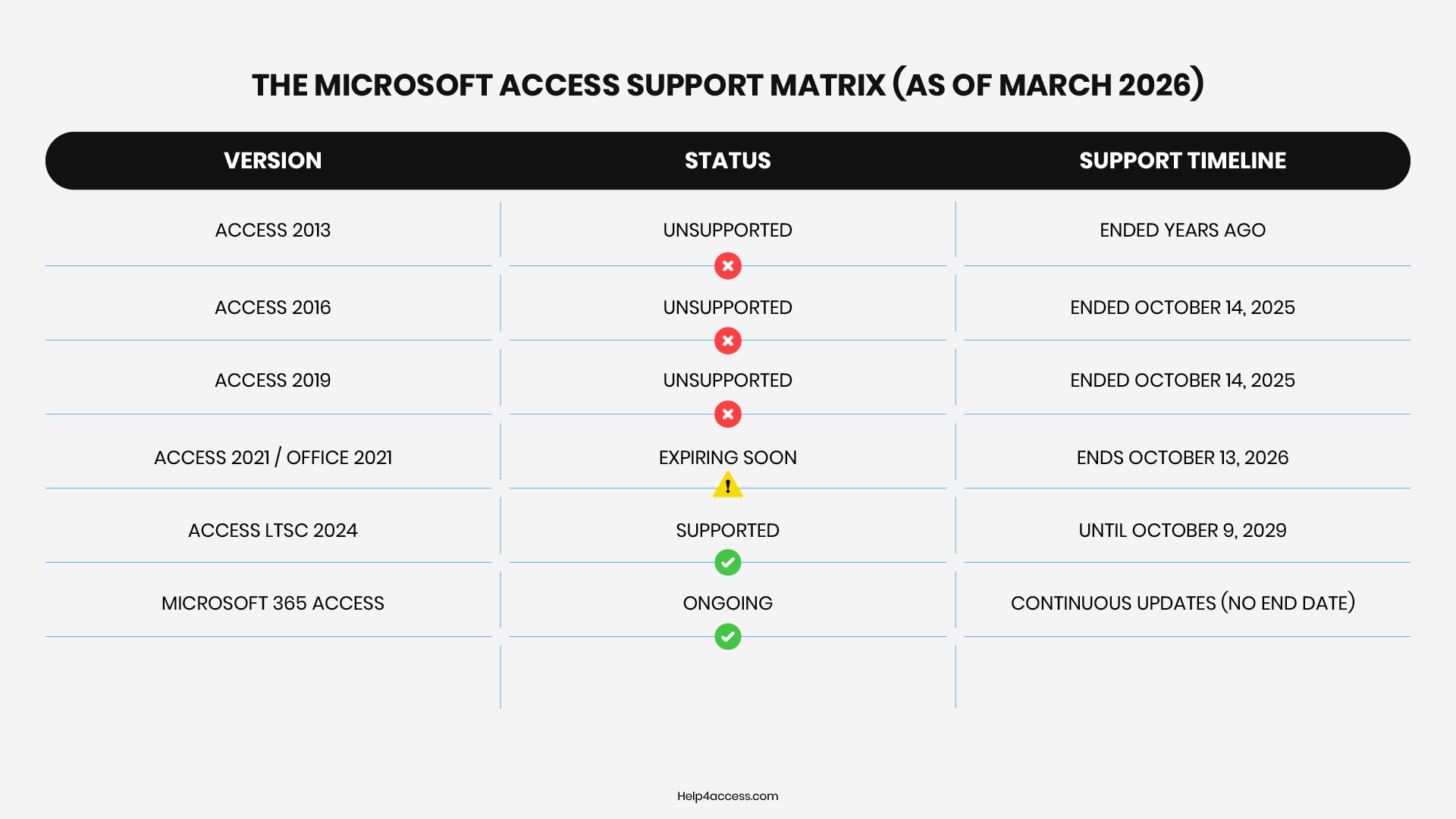
Yes, Microsoft Access is still supported in 2026, but with key caveats. Access 2021, Access 2024 (LTSC), and the Microsoft 365 version remain supported, while older editions like Access 2016 and 2019 have been unsupported since October 2025 and no longer receive security updates.
Microsoft 365 subscribers continue to have access to the latest version of Access through their subscription, which receives periodic updates — mostly maintenance and compatibility fixes rather than meaningful new functionality.
Oct 2025
Access 2016 & 2019 already lost all Microsoft support and security updates
Oct 13, 2026
Access 2021 & Office 2021 official end of support under Microsoft’s Modern Lifecycle Policy
Oct 2029
Access LTSC 2024 supported until October 9, 2029 — the safest perpetual license option today
Current Microsoft Access Support Status (2026)
Microsoft has not issued a formal end-of-life date for Access as a product — support is handled version by version. The matrix below shows exactly where each version stands today.
Microsoft’s Direction
The broader concern is the direction Microsoft is heading — investing heavily in cloud platforms like Power Apps, Dataverse, and Azure SQL. Access, fundamentally a desktop tool, does not fit naturally into that roadmap. Microsoft has never officially announced it is killing Access, but the lack of major innovation over the past decade speaks volumes. The last significant feature updates were years ago. What you see today is essentially what you get.
Microsoft Access End of Life 2026: What Changes This Year
On October 13, 2026, Access 2021 (and Office 2021) reaches its official end of support under Microsoft’s Modern Lifecycle Policy. After this date, Microsoft will no longer provide any updates, bug fixes, security patches, or technical support.
For businesses still using older versions, 2026 is a practical decision point because:
-
- Access 2016 and 2019 have already passed their support deadlines (October 2025).
-
- Running unsupported software puts you at real security and compliance risk.
-
- Legacy systems become increasingly costly and risky to maintain.
⚠️ Rather than waiting until a support deadline causes problems, organizations should treat 2026 as a strategic moment to assess their current setup and plan a transition to modern solutions — even if that means upgrading to Microsoft 365 Access, considering cloud-based platforms, or evaluating alternatives.
The “Ghost Database” Trap: Regulatory Retention vs. Security Risk
A common dilemma for financial and insurance IT leaders is the “regulatory retention trap.” Compliance regulations often mandate that historical data must be preserved and accessible for 7 to 10 years. To satisfy this, many firms keep legacy Microsoft Access databases active on old, unpatched servers—even if the data hasn’t been accessed in years.
This creates a massive, unmonitored security vulnerability. Keeping “ghost” databases running on legacy infrastructure to satisfy compliance actually creates a severe security risk that violates modern data protection standards. The solution is not to keep the legacy application alive, but to migrate the historical data to a secure, read-only SQL Server or Azure archive that satisfies retention laws without the security overhead.
Why Microsoft Access Has Been Falling Out of Favour
From Microsoft’s perspective, Access has been a success story. Since its launch in the 1990s, it bridged the gap between spreadsheets and professional database solutions, empowering non-developers to create custom applications while reducing reliance on IT. It gave non-technical users a way to build forms, run queries, and store data without needing a dedicated database administrator. For small businesses and internal teams, that was a big deal.
But the world has moved on in several important ways:
-
- Cloud computing: Businesses increasingly need data accessible from anywhere. We’ve helped companies like Target Media Solutions make exactly this shift, moving from a local Access system to anywhere, anytime cloud access. Access simply wasn’t built for that.
-
- Collaboration: Multiple users working on the same Access database at once has always been fragile. Cloud databases handle this far better — and the advantages of migrating to a cloud-based system become very clear once you see it in practice.
-
- Scalability: Access starts to strain with larger datasets and more concurrent users. It was never designed for enterprise scale.
-
- Integration: Modern business tools expect APIs and cloud connectivity. Access integrates poorly with today’s ecosystem.
-
- Mobile access: Access has no meaningful mobile story — a real limitation as workforces become more distributed.
None of this means Access was a bad product. It served its purpose well for a long time. But those limitations become harder to ignore as businesses grow and their needs become more complex.
MS Access Replacement Options Worth Considering
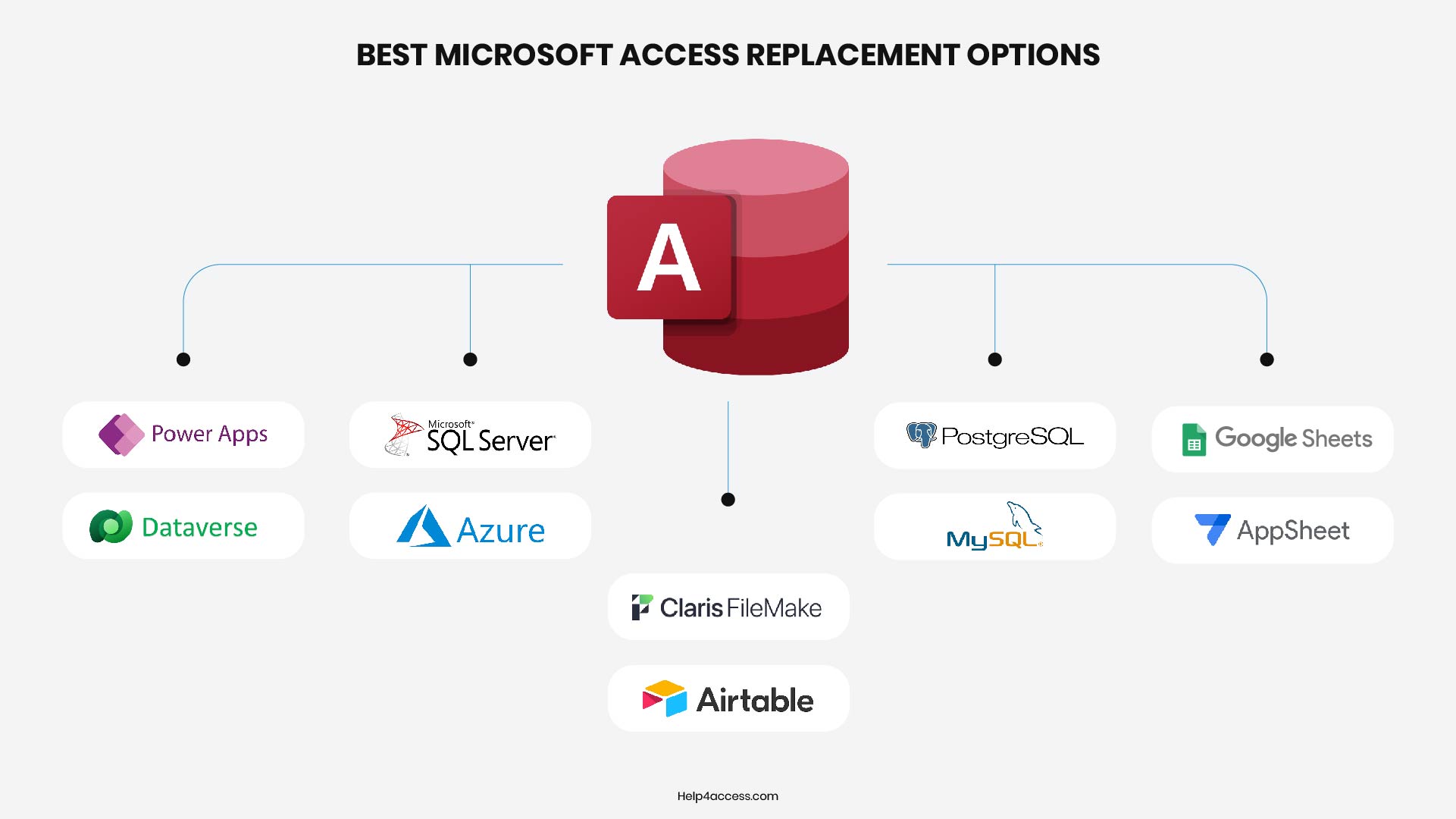
The good news is that there are solid alternatives depending on what you actually need. The right Microsoft Access replacement depends on the size of your operation, your technical capacity, and how central your database is to day-to-day work.
Microsoft Power Apps and Dataverse
Power Apps lets you build custom applications with forms and workflows, while Dataverse provides the underlying cloud database. It is more complex to set up than Access, but far more capable and cloud-native. Microsoft is actively investing in this platform, so it has a real future.
SQL Server or Azure SQL
For businesses that need a proper relational database, SQL Server (on-premises) or Azure SQL (cloud) are mature, well-supported options. They can handle significantly larger datasets, multiple concurrent users, and offer proper security controls. The trade-off is that you need someone with SQL knowledge to manage them, or a developer to build the front end.
FileMaker (Claris)
FileMaker is one of the oldest MS Access alternatives and has maintained a loyal following because it genuinely makes it easy for non-technical users to build functional databases. Now called Claris FileMaker, it has cloud capabilities. It is a commercial product with licensing costs, but the low-code approach makes it accessible for small teams.
Airtable
Airtable sits somewhere between a spreadsheet and a database. It is cloud-native, easy to use, and works well for teams that need structured data without the complexity of a traditional database system. It is not a direct technical replacement for Access, but for many use cases, it covers the same ground more simply.
PostgreSQL or MySQL
If you have some technical resources available, open source databases like PostgreSQL or MySQL are powerful, free, and widely supported. They require more setup and maintenance than a packaged solution, but they offer no vendor lock-in and scale well. Pair them with a tool like pgAdmin or a custom-built web interface and you have a solid long-term solution.
Google Sheets with AppSheet
For very simple use cases, Google Sheets combined with Google’s AppSheet platform can replicate some of what Access does. AppSheet lets you build mobile-friendly apps on top of spreadsheet data without coding. It is not suited for complex relational data, but it handles straightforward data collection and reporting well.
How to Decide Which MS Access Alternative Is Right for You
Before choosing a replacement, spend time understanding what you actually use Access for. Many businesses have accumulated Access databases over the years that serve very different purposes, and a one-size-fits-all replacement rarely works. It’s worth doing a proper buy vs. build analysis before committing to a direction.
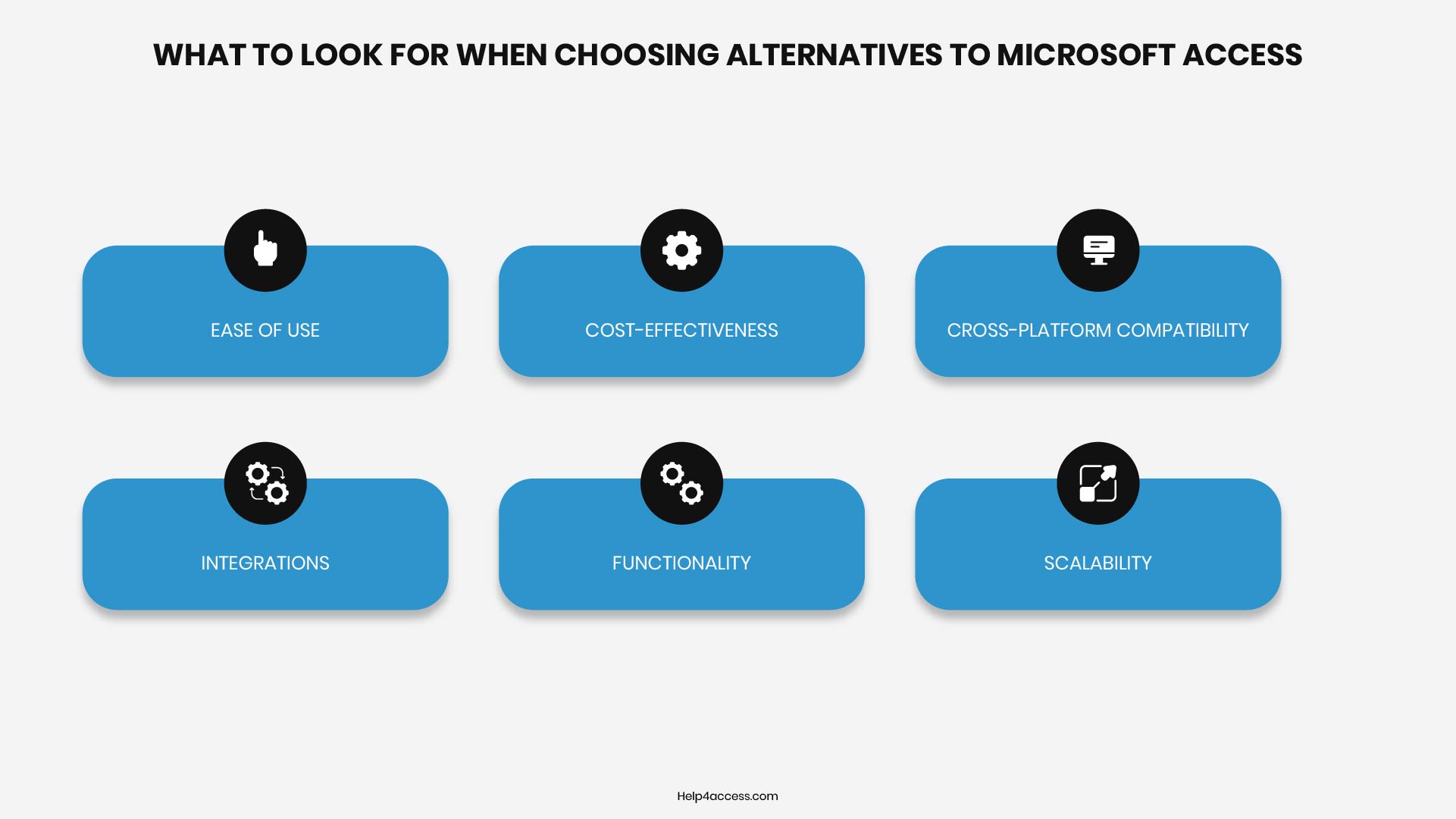
Ask these questions about each database or application you are replacing:
-
- How many people use this database daily?
-
- Does it need to be accessible remotely or on mobile devices?
-
- How complex is the data model? Are there many linked tables and relationships?
-
- Are there forms and reports that users rely on heavily?
-
- Does it connect to any other systems like accounting software or CRMs?
-
- What is the acceptable downtime during migration?
For simple, single-user databases, something like Airtable or even a well-structured spreadsheet might be enough. For multi-user operational systems, you are looking at a proper database platform with either a commercial front end or custom development.
It is also worth auditing how many Access databases your business actually has in use. Often there are forgotten databases that nobody realises are still running until something goes wrong. Our Discovery & Assessment service is specifically designed to surface these risks before they become emergencies — finding them now is far better than discovering them during a crisis.
How to Plan a Migration Away from Microsoft Access
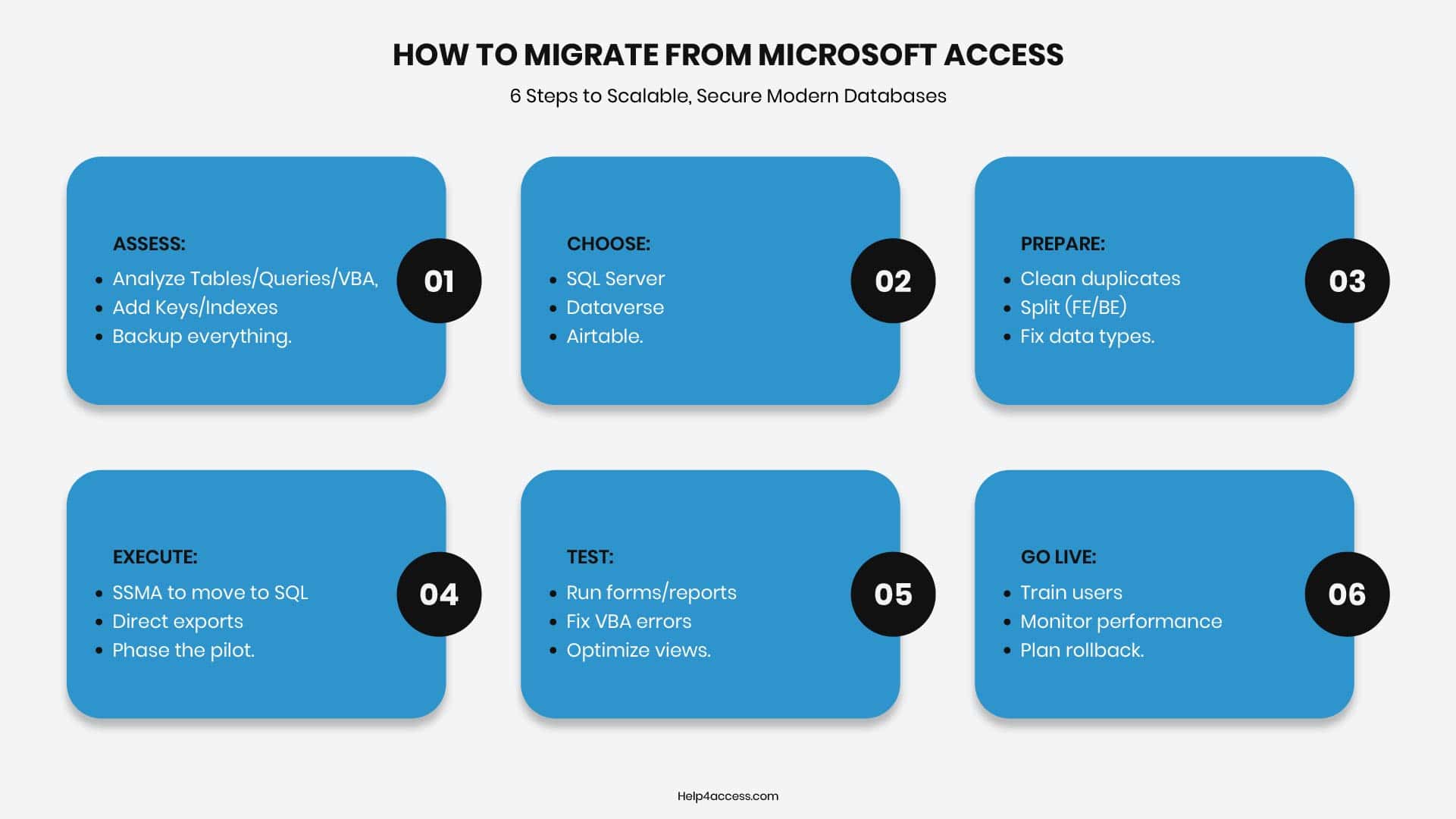
Planning a migration from Microsoft Access involves assessing your current setup, selecting a scalable alternative like SQL Server or Dataverse, and executing a structured process to minimize downtime. This ensures better performance, security, and multi-user support beyond Access’s 2 GB size limit and 255-user cap. You can read our free Microsoft Access Web Application Migration Strategy Report for a practical starting point.
1. Assess Current Database
Inventory all tables, queries, forms, relationships, VBA code, and data volume in your Access database. Add primary keys, indexes, and fix data type inconsistencies upfront, as SQL Server requires them for linked tables. Back up everything and test for issues like Attachment fields or multivalued fields, which need special handling.
2. Choose Target Platform
Popular options include SQL Server (on-premises or Azure) for enterprise scalability, Microsoft Dataverse/Power Apps for cloud apps and automation, or no-code tools like Airtable for simpler needs. SQL Server excels in high concurrency and backups during use, while Dataverse supports mobile apps and AI but has storage tiers (10 GB relational base).
Popular Access Alternatives Compared: Features, Cost, And Use Cases
| Platform | Best For | Starting Cost | Key Benefits Over Access |
|---|---|---|---|
| SQL Server / Azure SQL | Large data, multi-user | Free Express; $209+ | 100s of users, dynamic backups |
| Dataverse / Power Apps | Cloud apps, Teams | Included in M365 licenses | Apps on any device, automation |
| Airtable | Collaborative teams | $24/user/mo | Spreadsheet-like, easy integrations |
3. Preparation Steps
Cleanse data by removing duplicates, validating relationships, and converting unsupported types (e.g., Hyperlink to nvarchar). Split your Access file into front-end (forms/reports) and back-end (tables) if not already done, then install tools like SSMA for SQL or Access’s built-in Dataverse exporter.
4. Execute Migration
For SQL: Use SSMA to convert schema, synchronize, and migrate data — then link tables via ODBC. For Dataverse: Export directly from Access, mapping tables to entities in a solution for ALM. Migrate in phases — pilot with a subset of data first to surface issues before committing to a full cut-over.
5. Test and Optimize
Run queries, forms, and reports on linked tables; fix VBA or pass-through queries for server-side execution. Address common issues like date/time precision or #Deleted errors in linked views. Optimize by using server views for reports and minimizing client-side joins.
6. Train and Go Live
Document changes, train users on new front-ends (keep the Access UI initially if helpful), and monitor performance post-launch. Plan rollback if needed, and consider hybrid setups during transition. If your team needs hands-on guidance during this phase, our Microsoft Access training program is built to reduce dependency and build confidence.
🔧 Not Ready to Migrate Yet?
Our application support team can help stabilize and maintain your existing Access databases while you plan your transition. This gives you breathing room without increasing security or compliance risks.
A Few Conclusive Words
Microsoft Access is not being discontinued. Specific older versions are reaching end of support in 2026 (Access 2021) or have already done so (2016/2019), but the product remains available and supported in Microsoft 365 and Access LTSC 2024 (until 2029).
If your current databases are working well and you’re on a supported version, you can continue using them safely for now — but plan ahead. If Access has been feeling limited in terms of multi-user access, cloud availability, or scalability, this is a reasonable moment to evaluate what alternatives fit your workflows better.
For a clear understanding of your situation, our team at Help4Access can help assess your databases and create a practical migration plan. You can schedule a consultation to get straightforward guidance on your next steps.
Need Expert Guidance on Your Microsoft Access Situation?
Whether you need to stabilize, migrate, or simply understand your risk exposure — Help4Access provides clear, practical advice without the jargon. Start with a free consultation.
Frequently Asked Questions
Is Microsoft Access being discontinued?
No. Microsoft has not announced discontinuation. Access remains part of Microsoft 365 and the latest perpetual version (Access LTSC 2024, supported until 2029). Older individual versions are reaching end of support, but the product itself continues.
Is Microsoft Access still supported in 2026?
Yes, for supported versions. Access 2021 ends on October 13, 2026. Access LTSC 2024 is supported until October 9, 2029. Microsoft 365 Access receives ongoing updates. Access 2016 and 2019 have already lost support as of October 2025.
What is the best Microsoft Access replacement?
It depends on your needs. Microsoft 365 users usually choose Power Apps + Dataverse. For robust relational databases, SQL Server or Azure SQL. For simple collaborative work, Airtable or FileMaker. The right choice depends on the number of users, data complexity, and whether you need cloud or mobile access.
Will my existing Microsoft Access databases still work after the end of life date?
Yes, the files will continue to open and run. However, unsupported versions no longer receive security updates, creating compliance and security risks. Running unsupported software in a regulated industry can also create audit and liability issues.
How long does it take to migrate from Microsoft Access?
It depends entirely on the complexity of the database and the volume of data. Simple single-table databases can migrate in 1–2 days. Complex systems with many forms, reports, and VBA code can take weeks or months. Start planning early and use a phased approach to reduce risk.
Can I migrate Access data to Microsoft SQL Server?
Yes. Microsoft provides the free SQL Server Migration Assistant (SSMA) tool that handles tables, relationships, and most data. Forms, reports, and VBA code need to be recreated or relinked to the new back-end. A phased approach — migrating tables first, then rebuilding the front end — tends to work best.